<?xml version="1.0" encoding="utf-8"?><feed xmlns="http://www.w3.org/2005/Atom" ><generator uri="https://jekyllrb.com/" version="3.10.0">Jekyll</generator><link href="https://0531kim.github.io/feed.xml" rel="self" type="application/atom+xml" /><link href="https://0531kim.github.io/" rel="alternate" type="text/html" /><updated>2025-04-28T15:01:54+12:00</updated><id>https://0531kim.github.io/feed.xml</id><title type="html">Thought Debugging</title><subtitle>Kim&apos;s tech blog</subtitle><author><name>Kim</name><email>ki270023730@gmail.com</email></author><entry><title type="html">[Quad] 4. Improve performance using Redis!</title><link href="https://0531kim.github.io/quad/quad_4/" rel="alternate" type="text/html" title="[Quad] 4. Improve performance using Redis!" /><published>2025-04-05T00:00:00+13:00</published><updated>2025-04-05T00:00:00+13:00</updated><id>https://0531kim.github.io/quad/quad_4</id><content type="html" xml:base="https://0531kim.github.io/quad/quad_4/"><![CDATA[<h2 id="-1-introduction">📚 1. Introduction</h2>

<p>There are approximately 6,800 courses at the University of Auckland. These courses are organized into around 250 studies, which are further grouped into 9 faculties (including General Education).</p>

<h2 id="️-2-database-design-choices">🛠️ 2. Database Design Choices</h2>

<p>When designing the database, I considered a few options. One was to create three separate tables — Faculty, Study, and Course — and perform joins when querying, for example, the list of studies under a specific faculty. The other option was to consolidate all information into a single table with 6,800 rows.</p>

<p>I chose to create a single, denormalized table for the following reasons:</p>

<ol>
  <li>Courses rarely change, and the system would experience very few write or delete operations. In other words, the table can be treated as a static dataset with primarily read operations, making a single table sufficient.</li>
  <li>6,800 rows is relatively small and does not warrant normalization purely for size reasons. Querying such a table typically takes around <code class="language-plaintext highlighter-rouge">150ms</code>, which is fast enough that it would not negatively impact user experience (UX).</li>
</ol>

<p>Therefore, considering both the low update frequency and the acceptable query performance, I determined that a simple, denormalized design would be the most efficient and practical choice for this case.</p>

<h3 id="engineering-faculty-page--listing-studies"><strong>Engineering Faculty Page — Listing Studies</strong></h3>

<p><img src="/images/2025-04-05-quad_4/Screenshot 2025-04-26 at 9.32.52 PM.png" alt="Screenshot 2025-04-26 at 9.32.52 PM" style="zoom:30%;" /></p>

<h3 id="accounting-study-page-business-faculty--listing-courses"><strong>Accounting Study Page (Business Faculty) — Listing Courses</strong></h3>

<p><img src="/images/2025-04-05-quad_4/Screenshot 2025-04-26 at 9.35.05 PM.png" alt="Screenshot 2025-04-26 at 9.35.05 PM" style="zoom:30%;" /></p>

<h2 id="-3-ux-challenges-and-improvements">🎯 3. UX Challenges and Improvements</h2>

<p>Initially, I designed three separate pages: a <code class="language-plaintext highlighter-rouge">Faculty page</code>, a <code class="language-plaintext highlighter-rouge">Study page</code>, and a <code class="language-plaintext highlighter-rouge">Course page</code>. However, navigating to course reviews required too many steps: <strong>Faculty page → click → Study page → click → Course page → click → finally see the reviews</strong>.</p>

<p>To improve the user experience (UX), I replaced the Faculty page with a <code class="language-plaintext highlighter-rouge">faculty navigation bar</code> that allowed users to jump directly to their desired faculty. This reduced user’s click and made navigation much more intuitive.</p>

<h2 id="-4-performance-bottleneck-initial-observations">🐢 4. Performance Bottleneck: Initial Observations</h2>

<p>However, I noticed another issue: <strong>loading studies and courses felt slow</strong>. It wasn’t that it took longer than a second to load, but it still wasn’t as smooth and immediate as I wanted.</p>

<p>Upon reviewing my code, I initially suspected that <strong>alphabetical sorting</strong> might be a bottleneck. But after analyzing the complexity, I realized that sorting a maximum of 80 courses would only involve approximately <strong>O(n log n)</strong> = <code class="language-plaintext highlighter-rouge">504 comparisons</code> — a trivial amount of work for a modern CPU, likely completing within just a few milliseconds.</p>

<p>After further research, I discovered <code class="language-plaintext highlighter-rouge">Redis</code>.</p>

<h2 id="-5-implementing-redis-for-caching">🚀 5. Implementing Redis for Caching</h2>

<p><code class="language-plaintext highlighter-rouge">Redis</code> is an <strong><code class="language-plaintext highlighter-rouge">in-memory</code>, <code class="language-plaintext highlighter-rouge">NoSQL</code> key-value store</strong>, which was exactly what I needed.</p>

<p>Being ` NoSQL<code class="language-plaintext highlighter-rouge">-based means Redis stores data in flexible key-value structures, making it **highly accessible** and **intuitive** for my use case. Furthermore, its </code>schema-less` nature perfectly matches the structure of courses and studies, which do not require rigid relational models.</p>

<p>From a performance perspective, Redis is optimized for speed: <strong>all data is kept directly in <code class="language-plaintext highlighter-rouge">RAM</code> rather than on disk</strong>. This allows data retrieval times to skyrocket — <strong>accessing <code class="language-plaintext highlighter-rouge">RAM</code> is thousands of times faster than disk <code class="language-plaintext highlighter-rouge">I/O</code></strong>. Redis can easily handle <strong>hundreds of thousands of requests per second</strong>, making it an ideal solution for reducing latency and delivering a much smoother user experience.</p>

<h2 id="-6-conclusion">🎉 6. Conclusion</h2>

<p>I implemented caching for studies and courses using <code class="language-plaintext highlighter-rouge">Redis</code>, which significantly improved data retrieval speed compared to direct database queries. As a result, users experienced minimal loading times when navigating the frontend, and <strong>overall, the application’s responsiveness and user experience were greatly enhanced.</strong> Although there is still a slight delay, it has been reduced considerably. Beyond the performance improvements, I am also glad that I discovered <code class="language-plaintext highlighter-rouge">Redis</code> and its many powerful features through this process.</p>]]></content><author><name>Kim</name><email>ki270023730@gmail.com</email></author><category term="quad" /><category term="OAuth" /><category term="Sign-in" /><category term="Sign-up" /><summary type="html"><![CDATA[📚 1. Introduction]]></summary></entry><entry><title type="html">[Quad] 3. Sign-up &amp;amp; Sign-in</title><link href="https://0531kim.github.io/quad/quad_3/" rel="alternate" type="text/html" title="[Quad] 3. Sign-up &amp;amp; Sign-in" /><published>2025-03-24T00:00:00+13:00</published><updated>2025-03-24T00:00:00+13:00</updated><id>https://0531kim.github.io/quad/quad_3</id><content type="html" xml:base="https://0531kim.github.io/quad/quad_3/"><![CDATA[<h2 id="-major-update">🚨 Major update</h2>

<p>I made a significant change to my original plan. Initially, I intended to use only <code class="language-plaintext highlighter-rouge">JWT</code> (<code class="language-plaintext highlighter-rouge">Bearer Token</code>)–based authentication for all users. However, I decided to integrate <code class="language-plaintext highlighter-rouge">Google OAuth</code> authentication to <strong>allow users to sign in without storing their credentials on the <code class="language-plaintext highlighter-rouge">Quad</code> server</strong>.</p>

<p>This decision was made with user trust in mind. I realized that some students might be hesitant to register due to concerns about the security of the <code class="language-plaintext highlighter-rouge">Quad</code> server. By using <code class="language-plaintext highlighter-rouge">OAuth</code>, <strong>users can authenticate via <code class="language-plaintext highlighter-rouge">Google</code>, ensuring that their credentials are never directly handled or stored by our backend</strong>.</p>

<p>I did not implement a “Sign Up with Google” button on the registration page. Instead, I separated the flow into two distinct endpoints:</p>

<ol>
  <li><strong>First-time Google OAuth users</strong>: After successfully authenticating via <code class="language-plaintext highlighter-rouge">Google</code>, users are redirected to a page where they must set a unique username to complete their account setup.</li>
  <li><strong>Returning Google OAuth users</strong>: If the user has previously signed up using <code class="language-plaintext highlighter-rouge">Google OAuth</code>, they are redirected directly to the main page, and a <code class="language-plaintext highlighter-rouge">cookie</code> containing the <code class="language-plaintext highlighter-rouge">JWT</code> is set on the client side for session management.</li>
</ol>

<h2 id="-api-endpoints-for-sign-up-and-sign-in">🚏 Api Endpoints for Sign-up and Sign-in</h2>

<p>To implement complete authentication logic (including OAuth support and email verification), I have created the following <strong>server-side API endpoints</strong>:</p>

<ol>
  <li>
    <p>Post /api/v1/auth/sign-in</p>
  </li>
  <li>
    <p>Post /api/v1/auth/sign-up</p>
  </li>
  <li>
    <p>Post /api/v1/auth/email-verification</p>

    <p>​	: Sends a verification code to the provided email address.</p>
  </li>
  <li>
    <p>Post /api/v1/auth/confirm-email-verification</p>

    <p>​	: Validates the verification code submitted by the user.</p>
  </li>
  <li>
    <p>Post /api/v1/auth/username-check</p>

    <p>​	: Checks whether the desired username is already in use.</p>
  </li>
  <li>
    <p>Patch /api/v1/auth/change-username</p>

    <p>​	: Updates a user’s username. This is only used for users who sign up via OAuth, as they are initially assigned a default username. This endpoint allows them to set a custom, unique username.</p>
  </li>
</ol>

<h2 id="-email-verification-code">🎰 Email verification code</h2>

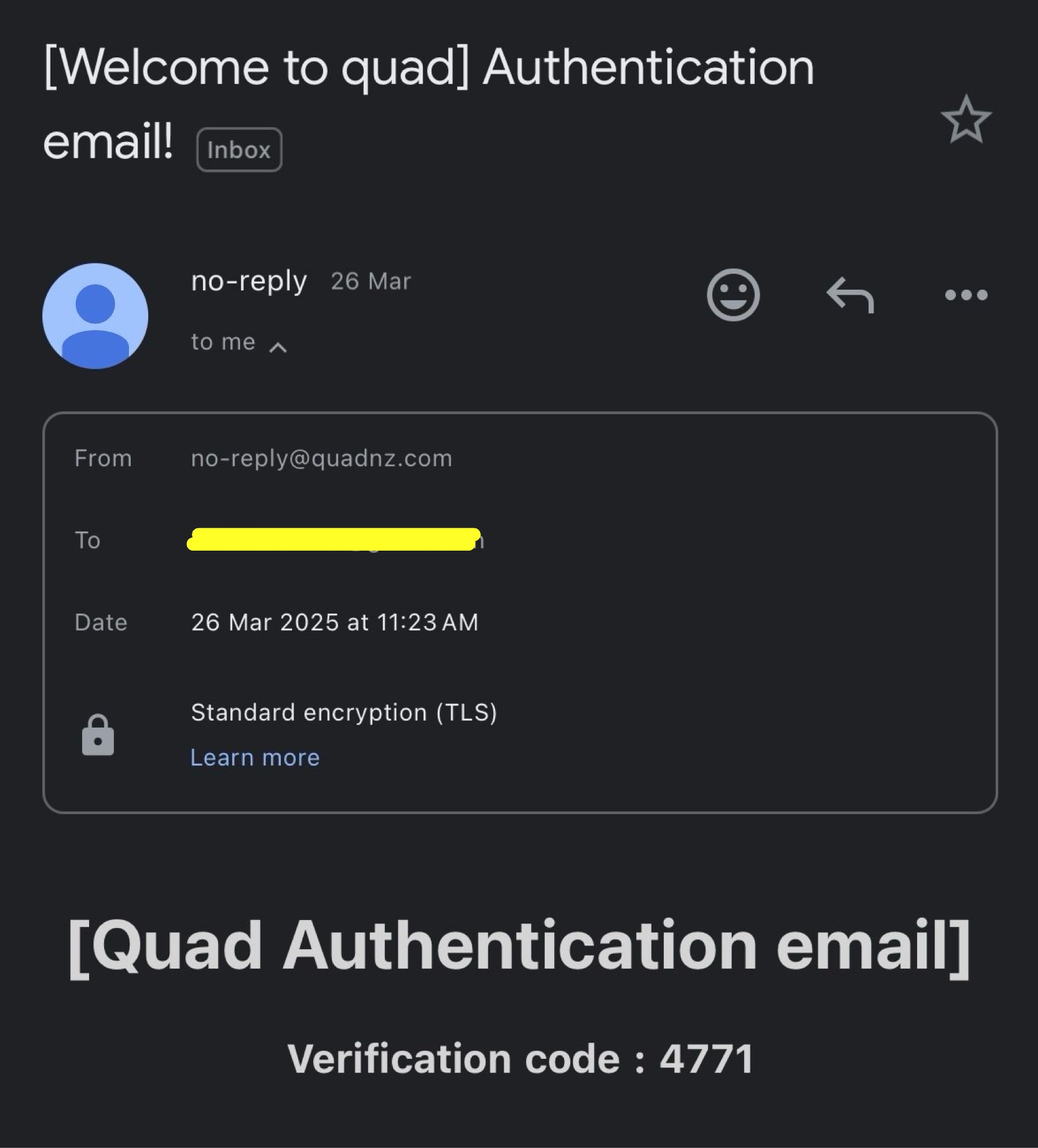
<p>I recently purchased the domain <strong>quadnz.com</strong> to set up a custom enterprise <code class="language-plaintext highlighter-rouge">Google email</code> for my project. As part of the user sign-up process, I needed an email address to send verification codes. I decided to use the standard naming convention and created:</p>

<blockquote>
  <p><strong>no-reply@quadnz.com</strong></p>
</blockquote>

<p><img src="/images/2025-03-24-quad_3/Image-1.jpg" alt="Image-1" style="zoom:33%;" /></p>

<h2 id="-sign-up-and-sign-in-pages">🏠 Sign-up and Sign-in pages</h2>

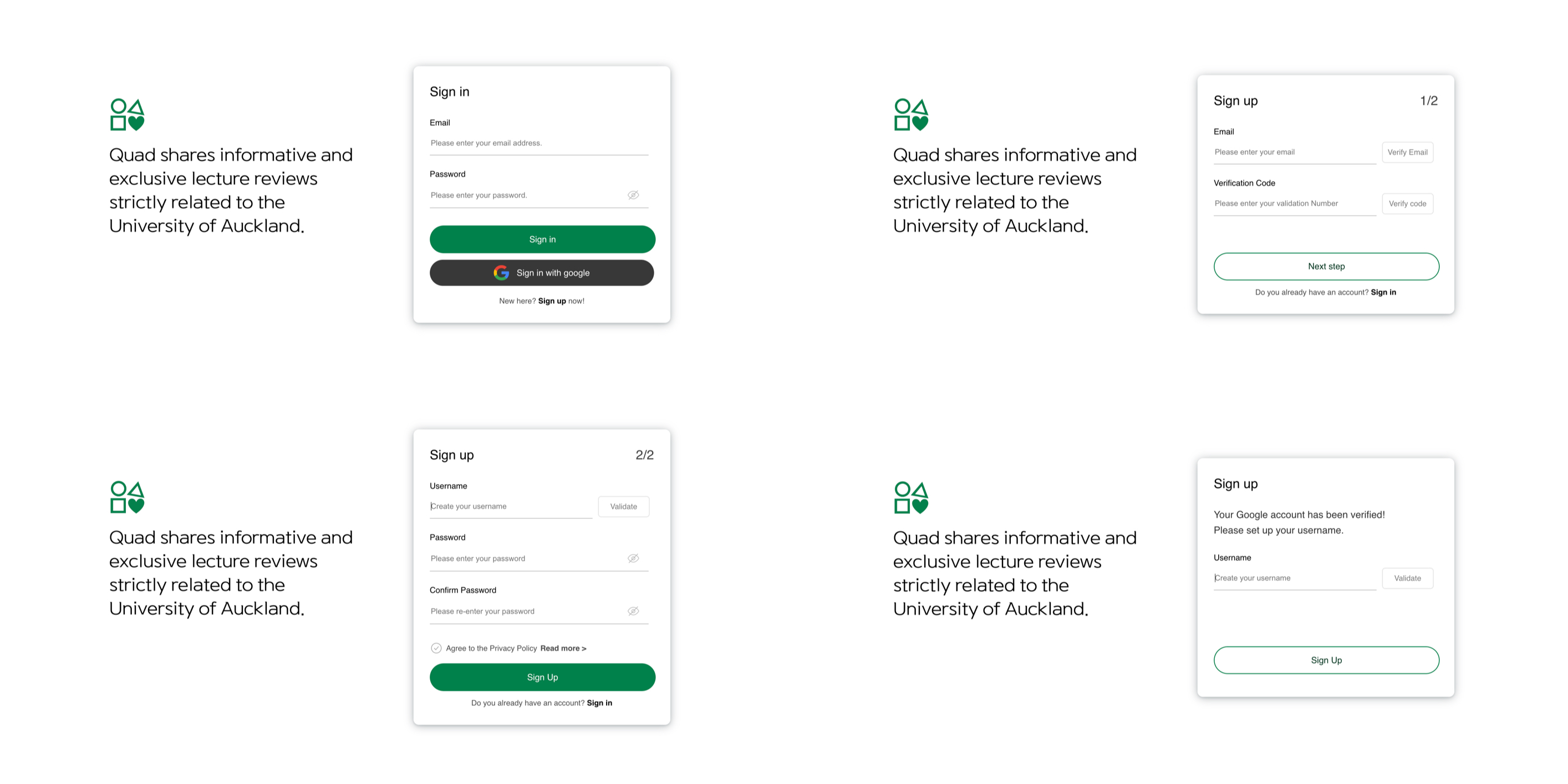
<p><code class="language-plaintext highlighter-rouge">Sign-up</code> and <code class="language-plaintext highlighter-rouge">Sign-in</code> is implemented with 4 pages.</p>

<p><img src="/images/2025-03-24-quad_3/IMG_2783.JPG" alt="IMG_2783" /></p>

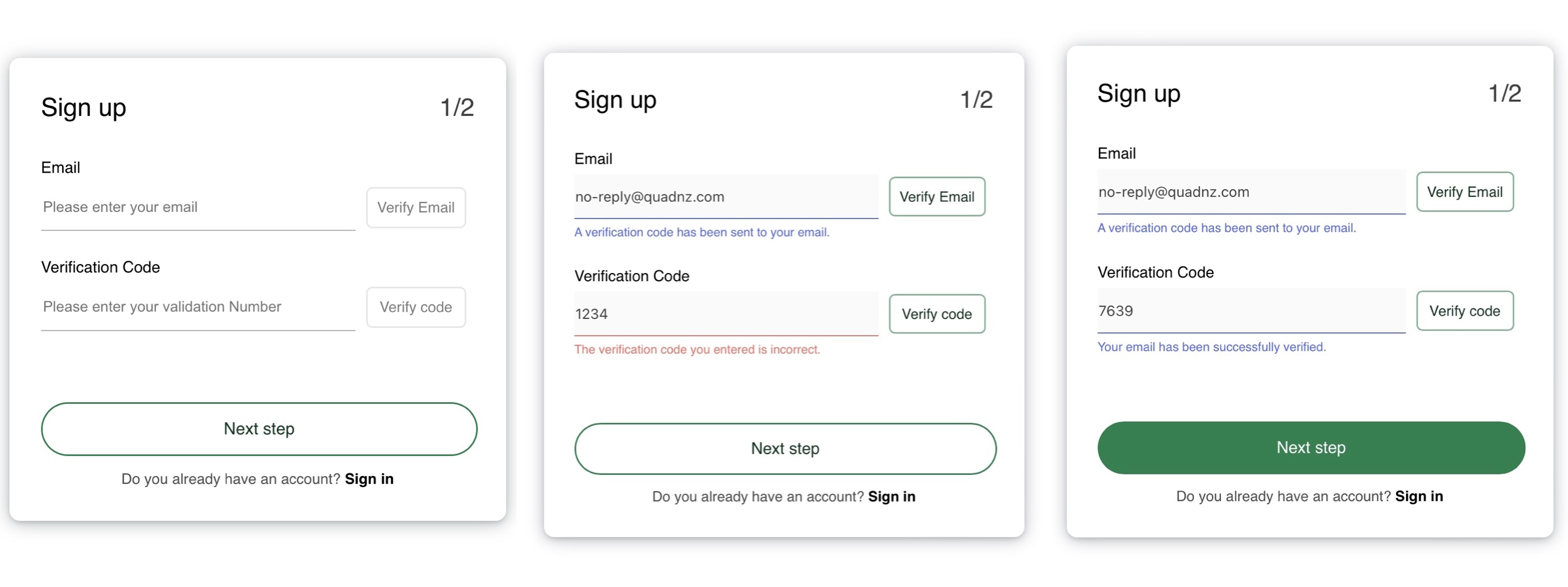
<p>As users enter <code class="language-plaintext highlighter-rouge">input</code> or <code class="language-plaintext highlighter-rouge">verification codes</code>, buttons <strong>gradually light up</strong> to guide their actions. Blue text indicates success, while red text is used for error messages.</p>

<p><img src="/images/2025-03-24-quad_3/IMG_2788.jpg" alt="IMG_2788" /></p>

<p>When a user signs in with <code class="language-plaintext highlighter-rouge">Google (OAuth)</code> for the first time, they are redirected to a page where they need to set their username. <strong>Technically, they already have a default username assigned during <code class="language-plaintext highlighter-rouge">sign-up</code>, so this step is actually about changing the default username to a custom one.</strong></p>

<p><img src="/images/2025-03-24-quad_3/Screenshot 2025-03-27 at 5.50.40 PM.jpg" alt="Screenshot 2025-03-27 at 5.50.40 PM" /></p>

<h2 id="conclusion"><strong>Conclusion</strong></h2>

<p>This time I worked hard to implement <strong>Google OAuth</strong>, and honestly—it was a lot of fun. Seeing my site evolve and finally start to feel like a “proper website” was incredibly satisfying.</p>

<p>Moreover, implementing <code class="language-plaintext highlighter-rouge">sign-up</code> and <code class="language-plaintext highlighter-rouge">sign-in</code> also gave me a chance to think more deeply about <code class="language-plaintext highlighter-rouge">user experience (UX)</code>. I put a lot of effort into making the <code class="language-plaintext highlighter-rouge">sign-up</code> flow feel smooth and intuitive. I didn’t want users to get bored or confused and leave halfway through the process. That’s why I designed the buttons to gradually light up as users interact with the form.</p>

<p>Next up: I’ll be working on the main page. There’s a lot more to do there. I’m planning to build a <code class="language-plaintext highlighter-rouge">header</code>, a <code class="language-plaintext highlighter-rouge">sidebar</code>, a <code class="language-plaintext highlighter-rouge">trending reviews</code> , <code class="language-plaintext highlighter-rouge">recent reviews</code>, and possibly even a <code class="language-plaintext highlighter-rouge">review chart</code> to visualize some data.</p>]]></content><author><name>Kim</name><email>ki270023730@gmail.com</email></author><category term="quad" /><category term="OAuth" /><category term="Sign-in" /><category term="Sign-up" /><summary type="html"><![CDATA[🚨 Major update]]></summary></entry><entry><title type="html">[Quad] 2. Authentication</title><link href="https://0531kim.github.io/quad/quad_2/" rel="alternate" type="text/html" title="[Quad] 2. Authentication" /><published>2025-03-13T00:00:00+13:00</published><updated>2025-03-13T00:00:00+13:00</updated><id>https://0531kim.github.io/quad/quad_2</id><content type="html" xml:base="https://0531kim.github.io/quad/quad_2/"><![CDATA[<h2 id="three-ways-to-implement-authentication"><strong>Three Ways to Implement Authentication</strong></h2>

<p>Before implementing user sign-in and sign-up, we need to decide on an authentication method. Generally, there are three common authentication approaches:</p>
<ol>
  <li>
    <p><strong>Basic authentication</strong>: This method involves sending the user’s credentials (user ID and password) encoded in <code class="language-plaintext highlighter-rouge">Base64</code> with every request. While it is simple to implement, several critical issues make it unsuitable:</p>

    <ol>
      <li>Insecure: Basic authentication transmits credentials in an encoded format, <strong>not encrypted.</strong> Encoding is reversible, meaning <strong>attackers can easily decode and retrieve user credentials</strong>.</li>
      <li>Lack of session management: Since there is no session or token-based authentication, <strong>users must send their credentials with every request.</strong> This results in a poor user experience😡, as users have to repeatedly enter their credentials for every interaction, such as liking or commenting.</li>
    </ol>
  </li>
  <li>
    <p><strong>OAuth Authentication</strong>: Many of you have likely signed up for a website using third-party providers such as Google or GitHub. This process is implemented using <code class="language-plaintext highlighter-rouge">OAuth authentication</code>. <strong><code class="language-plaintext highlighter-rouge">OAuth</code> allows users to sign in using external identity providers (e.g., Google, GitHub) without directly handling their credentials.</strong></p>

    <p>However, I have decided not to use <code class="language-plaintext highlighter-rouge">OAuth</code> for <code class="language-plaintext highlighter-rouge">Quad</code> because I will not be integrating third-party authentication services. Although <code class="language-plaintext highlighter-rouge">OAuth</code> can also support internal authentication systems, implementing it requires significantly more time and effort compared to the next authentication method I will introduce.</p>
  </li>
  <li>
    <p>Bearer Token: When a client signs in, the server generates and transmits a <code class="language-plaintext highlighter-rouge">Bearer Token</code> to the client. This token remains valid until its expiration time set within the token.</p>

    <p>Once the client receives the <code class="language-plaintext highlighter-rouge">Bearer Token</code>, it can use it for authentication by attaching it to the <code class="language-plaintext highlighter-rouge">HTTP request header</code> when accessing protected resources. This is a example of an <code class="language-plaintext highlighter-rouge">HTTP request header</code> with a <code class="language-plaintext highlighter-rouge">Bearer Token</code>:</p>

    <div class="language-bash highlighter-rouge"><div class="highlight"><pre class="highlight"><code>Authorization: Bearer &lt;token&gt;
</code></pre></div>    </div>

    <p>I will implement <code class="language-plaintext highlighter-rouge">Bearer Token</code> authentication using <code class="language-plaintext highlighter-rouge">JWT</code> (JSON Web Token), which provides secure and stateless authentication. It ensures security through encryption with specific algorithms, and its stateless nature eliminates the need for servers to store session data. This means the server doesn’t need to query the database for each request, resulting in faster and more efficient authentication.</p>
  </li>
</ol>

<h2 id="jwt-who-are-you">JWT…? Who are you?</h2>

<ol>
  <li>
    <h3 id="how-is-a-jwt-token-structured">How is a JWT token structured?</h3>

    <p><code class="language-plaintext highlighter-rouge">Jwt</code> is consist of three parts, separated by dots(.):</p>

    <div class="language-bash highlighter-rouge"><div class="highlight"><pre class="highlight"><code>&lt;Header&gt;.&lt;Payload&gt;.&lt;Signature&gt;
</code></pre></div>    </div>

    <div class="language-bash highlighter-rouge"><div class="highlight"><pre class="highlight"><code>eyJhbGciOiJIUzI1NiIsInR5cCI6IkpXVCJ9.eyJzdWIiOiJ1c2VyQGV4YW1wbGUuY29tIiwicm9sZSI6ImFkbWluIiwiZXhwIjoxNzEwOTUwNDAwfQ.H0VlMa2UNxIl_6Im7vx2gCy0j2sr_vsaKdmX9EoIqKw
<span class="c">### This is what a JWT looks like.</span>
<span class="c">### Try to find the two dots separating the JWT sections!</span>
</code></pre></div>    </div>

    <ol>
      <li>Header: This section defines the signing algorithm. I chose a <strong>symmetric key algorithm</strong> because it’s simpler to implement than <strong>asymmetric key algorithms.</strong> 😂</li>
      <li>Payload: It contains <strong>data fields</strong>, such as user data and <code class="language-plaintext highlighter-rouge">JWT</code> expiration time. ✅ Every payload properties are called <code class="language-plaintext highlighter-rouge">claims</code>.</li>
      <li>Signature: The signature is generated when the <code class="language-plaintext highlighter-rouge">JWT</code> is created. It is formed by encrypting the header and payload using the server’s <code class="language-plaintext highlighter-rouge">secret key</code>. Once created, the signature cannot be altered.</li>
    </ol>
  </li>
  <li>
    <h3 id="how-is-jwt-used-for-authentication">How is JWT used for authentication?</h3>

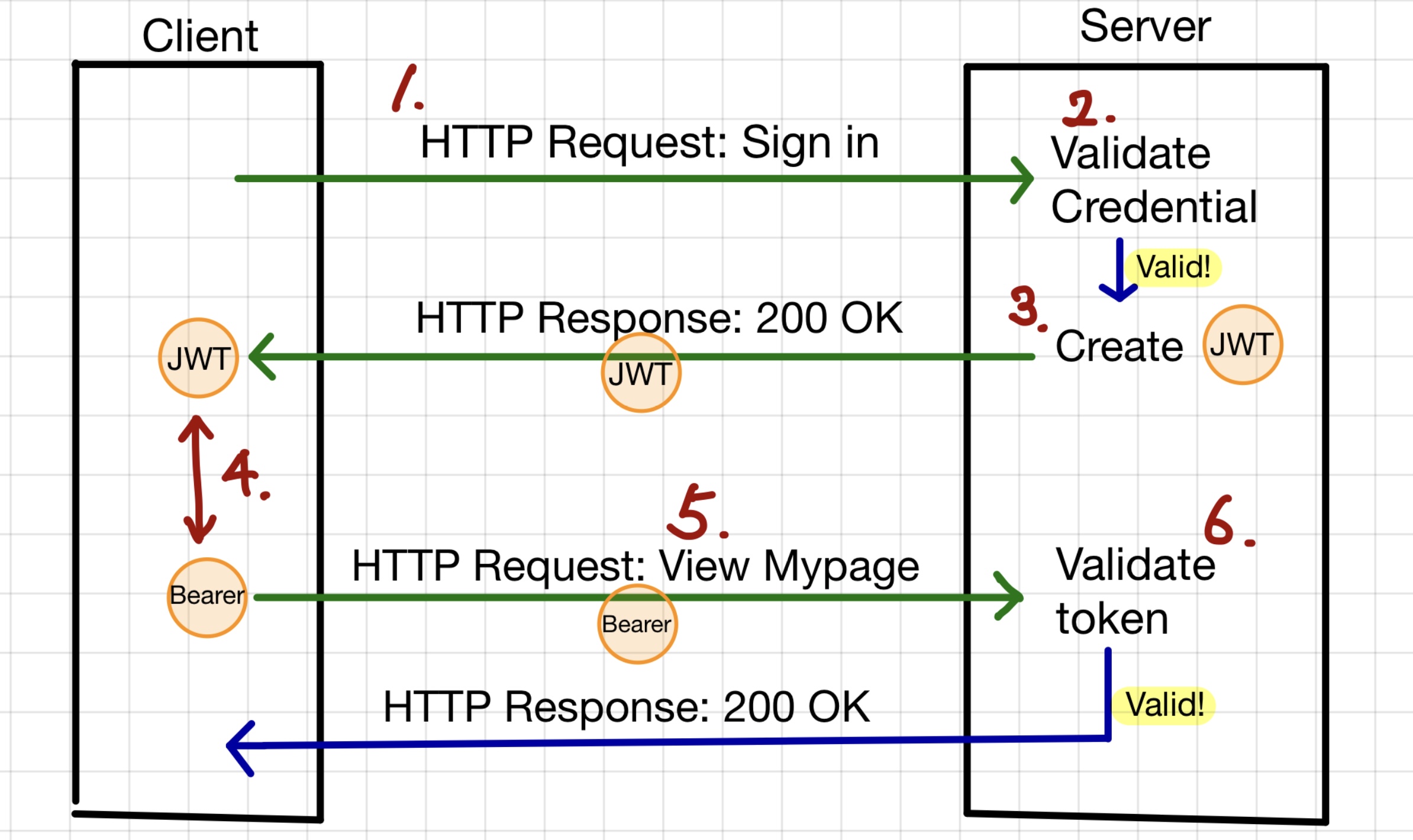
    <p><img src="/images/2025-03-13-quad_2/IMG_2646.jpg" alt="IMG_2646" style="zoom:25%" class="align-center" /></p>

    <ol>
      <li>The client signs in with a username and password and sends an <code class="language-plaintext highlighter-rouge">HTTP request</code> to the server for authentication.</li>
      <li>The server verifies whether the provided credentials are valid by checking them against the database.</li>
      <li>If valid, the server generates a <code class="language-plaintext highlighter-rouge">JWT</code>, and sends it to the client in an <code class="language-plaintext highlighter-rouge">HTTP response</code> as a<code class="language-plaintext highlighter-rouge">JSON</code> object.</li>
      <li>Once the client stores the <code class="language-plaintext highlighter-rouge">JWT</code>, it is used as a <code class="language-plaintext highlighter-rouge">Bearer Token</code> for authentication.</li>
      <li>For future requests, the client includes the <code class="language-plaintext highlighter-rouge">Bearer Token</code> in the <code class="language-plaintext highlighter-rouge">HTTP</code> headers until the <code class="language-plaintext highlighter-rouge">JWT</code> expires.</li>
      <li>When the client sends a request with the <code class="language-plaintext highlighter-rouge">Bearer Token</code>, the server verifies the <code class="language-plaintext highlighter-rouge">JWT</code>. If the token is valid and not expired, the server processes the request; otherwise, it rejects it.</li>
    </ol>
  </li>
</ol>

<h2 id="in-which-part-of-the-application-is-the-bearer-token-validated">In which part of the application is the Bearer token validated?</h2>

<p>In <code class="language-plaintext highlighter-rouge">Spring Boot</code>, when a client sends a request, it passes through several filters before reaching the controller. <strong>Filters act as a security layer</strong>, verifying whether the request is valid.</p>

<p>Generally the request first goes through</p>

<ol>
  <li>
    <p><code class="language-plaintext highlighter-rouge">CORS</code> filter</p>
  </li>
  <li>
    <p><code class="language-plaintext highlighter-rouge">Spring Security</code> filter</p>
  </li>
  <li>
    <p>Custom filters like <code class="language-plaintext highlighter-rouge">JwtAuthenticationFilter</code></p>
  </li>
  <li>
    <p>And finally reaches the <code class="language-plaintext highlighter-rouge">DispatcherSevlet</code> which maps HTTP request to appropriate controller.</p>
  </li>
</ol>

<hr />

<ol>
  <li>
    <h3 id="cors-filter">CORS filter</h3>

    <p>To understand <code class="language-plaintext highlighter-rouge">CORS</code>(Cross-Origin Resource Sharing), we need to understand <code class="language-plaintext highlighter-rouge">SOP(Same-Origin Policy)</code>. <code class="language-plaintext highlighter-rouge">SOP</code>  is a fundamental security mechanism enforced by web browsers that restricts web pages from making requests to a different origin (protocol, domain, or port) than the one that served them. Origin refers to  the protocol, hostname and port of a web application. Here is a example of origin:</p>

    <div class="language-bash highlighter-rouge"><div class="highlight"><pre class="highlight"><code>&lt;protocol&gt;://&lt;<span class="nb">hostname</span><span class="o">&gt;</span>:&lt;port&gt;
<span class="c">## e.g. http://localhost:3000</span>
</code></pre></div>    </div>

    <p>By default, <code class="language-plaintext highlighter-rouge">SOP</code> prevents unauthorized cross-origin requests, protecting data from malicious websites. For example, a front-end application running on <strong>http://localhost:3000</strong> cannot directly access an API hosted at <strong>http://localhost:8080</strong> due to <code class="language-plaintext highlighter-rouge">SOP</code> restrictions.</p>

    <p>To enable cross-origin communication, the backend server must <strong>explicitly allow the frontend domain</strong> using <code class="language-plaintext highlighter-rouge">CORS</code> (Cross-Origin Resource Sharing).</p>

    <p>To allow a frontend (http://localhost:3000) to send requests to the backend, configuring <code class="language-plaintext highlighter-rouge">CORS</code> in the backend is required.</p>

    <div class="language-java highlighter-rouge"><div class="highlight"><pre class="highlight"><code><span class="nc">CorsConfiguration</span> <span class="n">configuration</span> <span class="o">=</span> <span class="k">new</span> <span class="nc">CorsConfiguration</span><span class="o">();</span>
        <span class="n">configuration</span><span class="o">.</span><span class="na">addAllowedOrigin</span><span class="o">(</span><span class="s">"http://localhost:3000"</span><span class="o">);</span>
</code></pre></div>    </div>
  </li>
  <li>
    <h3 id="spring-security-filter">Spring Security filter</h3>

    <p>Spring security applies security logics such as authentication (who you are), authorization (what can you access) and <code class="language-plaintext highlighter-rouge">CSRF</code> (Cross-Site Request Forgery) protection.</p>

    <p>In WebSecurityConfig.java, the security configuration file, there’s an interesting point to highlight.</p>

    <div class="language-java highlighter-rouge"><div class="highlight"><pre class="highlight"><code><span class="n">httpSecurity</span><span class="o">.</span><span class="na">csrf</span><span class="o">(</span><span class="nl">CsrfConfigurer:</span><span class="o">:</span><span class="n">disable</span><span class="o">)</span>
</code></pre></div>    </div>

    <p>I have explicitly disabled <code class="language-plaintext highlighter-rouge">CSRF</code>. Even for someone unfamiliar with <code class="language-plaintext highlighter-rouge">CSRF</code>, just reading the term might give the impression that disabling it is a bad idea. So why have I disabled it?</p>

    <p><code class="language-plaintext highlighter-rouge">CSRF</code> (Cross-Site Request Forgery) is an attack where a malicious website tricks an authenticated user into making unwanted requests to a web application while <strong>they are logged in</strong>. <strong>Being logged in means that the user is authenticated and has an active session on the server, rather than using stateless token-based authentication like JWT.</strong> In other words, it can be safely disabled when using <code class="language-plaintext highlighter-rouge">JWT</code> or <code class="language-plaintext highlighter-rouge">Bearer Tokens</code>.</p>
  </li>
  <li>
    <h3 id="jwtauthenticationfilter">JwtAuthenticationFilter</h3>

    <p>JwtAuthenticationFilter is a custom Spring Security filter that extracts the JWT from the Authorization header, and validates it using JwtProvider. If the token is valid, it extracts the user details and stores them in SecurityContextHolder, making the user data accessible throughout the application.</p>

    <div class="language-java highlighter-rouge"><div class="highlight"><pre class="highlight"><code><span class="nc">SecurityContext</span> <span class="n">securityContext</span> <span class="o">=</span> <span class="nc">SecurityContextHolder</span><span class="o">.</span><span class="na">createEmptyContext</span><span class="o">();</span>
<span class="n">securityContext</span><span class="o">.</span><span class="na">setAuthentication</span><span class="o">(</span><span class="n">authenticationToken</span><span class="o">);</span>
   
<span class="nc">SecurityContextHolder</span><span class="o">.</span><span class="na">setContext</span><span class="o">(</span><span class="n">securityContext</span><span class="o">);</span>
</code></pre></div>    </div>
  </li>
</ol>]]></content><author><name>Kim</name><email>ki270023730@gmail.com</email></author><category term="quad" /><category term="OAuth" /><category term="Bearer Token" /><category term="JWT" /><summary type="html"><![CDATA[Three Ways to Implement Authentication]]></summary></entry><entry><title type="html">[Quad] 1. Intro + DCL, DDL and DML</title><link href="https://0531kim.github.io/quad/quad_1/" rel="alternate" type="text/html" title="[Quad] 1. Intro + DCL, DDL and DML" /><published>2025-03-09T00:00:00+13:00</published><updated>2025-03-09T00:00:00+13:00</updated><id>https://0531kim.github.io/quad/quad_1</id><content type="html" xml:base="https://0531kim.github.io/quad/quad_1/"><![CDATA[<p class="notice--info"><strong>University of Auckland students struggle with uncertainty every semester when deciding which papers to enroll in. They search for the paper they want to enroll in on search engines and social media platforms but rarely find useful information about it. Moreover, the few posts or comments they do come across are often outdated and unhelpful.</strong></p>

<h2 id="getting-started">Getting Started</h2>

<p>Therefore, I decided to create a website where UOA students can write lecture reviews and give ratings. This will allow students to enroll in the paper that best fits their needs. I was not able to find any front-end developer, but I guess this could be the perfect opportunity for me to become a full-stack developer.</p>

<p>This week, I have been working on the fundamentals of building a website: creating a rough draft using <code class="language-plaintext highlighter-rouge">Figma</code>, defining APIs in <code class="language-plaintext highlighter-rouge">Notion</code>, setting up the file structure with <code class="language-plaintext highlighter-rouge">Visual Studio Code</code>, and initializing database using <code class="language-plaintext highlighter-rouge">DCL</code>, <code class="language-plaintext highlighter-rouge">DML</code>, and <code class="language-plaintext highlighter-rouge">DDL</code>.</p>

<p>I decided to name a website <code class="language-plaintext highlighter-rouge">Quad</code>, name after the area at UOA where students gather and have meal together. For the backend, I will be using <code class="language-plaintext highlighter-rouge">Spring Boot</code> and <code class="language-plaintext highlighter-rouge">java</code>, while the frontend will be built with <code class="language-plaintext highlighter-rouge">React</code> and <code class="language-plaintext highlighter-rouge">TypeScript</code>. <code class="language-plaintext highlighter-rouge">MySQL</code> will be the database at the moment, though that may change later.</p>

<h2 id="logo">Logo</h2>

<p><img src="/images/2025-03-09-quad_week1/quadLogo.png" alt="quadLogo" style="zoom:25%;" class="align-center" /></p>

<p>Each <strong>circle, tilted triangle, and square</strong> represents students from diverse backgrounds. The heart symbolizes the love we share and receive in our campus!</p>

<h2 id="rough-draft-created-in-figma">Rough draft created in Figma</h2>

<p><img src="/images/2025-03-09-quad_week1/Screenshot 2025-03-10 at 1.37.34 PM.png" alt="Screenshot 2025-03-10 at 1.37.34 PM" style="zoom:80%;" /></p>

<p><img src="/images/2025-03-09-quad_week1/Screenshot 2025-03-10 at 1.37.54 PM.png" alt="Screenshot 2025-03-10 at 1.37.54 PM" style="zoom:80%;" /></p>

<p>The most important thing I focused on while designing the website was ensuring that the reviews are well-categorized by its department and study so that users can easily find the review they are looking for.</p>

<h2 id="visualizing-api-structure">Visualizing API structure</h2>

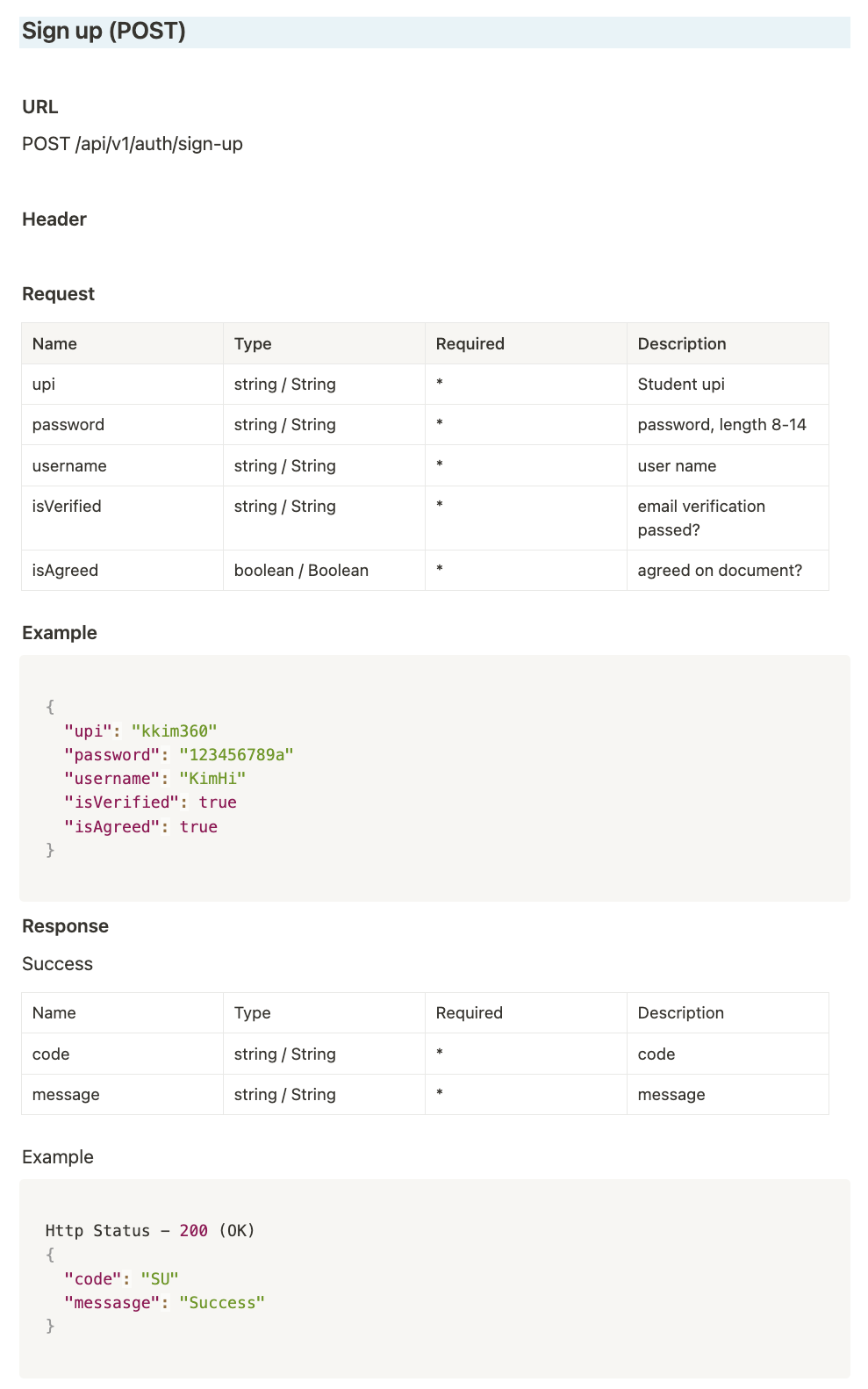
<p><img src="/images/2025-03-09-quad_week1/apiDocExample-1595297.png" alt="apiDocExample" style="zoom:50%;" class="align-center" /></p>

<p><a href="https://charming-libra-b65.notion.site/API-docs-1aeb6278b6c48017a43eebb98aec18a3?pvs=4" class="align-center">Link to the API document</a></p>

<p>An <code class="language-plaintext highlighter-rouge">API document</code> is a structured document that organizes API endpoints by their addresses. It includes details such as <strong>HTTP methods, API addresses, variable names, data types for requests and responses, and HTTP status codes.</strong></p>

<p>Creating an <code class="language-plaintext highlighter-rouge">API document</code> offers several benefits. In real-world development, an <code class="language-plaintext highlighter-rouge">API document</code> is can be used to enables frontend developers to work independently without relying on backend data. By mocking <code class="language-plaintext highlighter-rouge">API responses</code>, the frontend can proceed with development without waiting for the backend to be completed.</p>

<p>However, as a full-stack developer handling both frontend and backend, the primary reason for creating an API document is to <strong>synchronize types, variables, and error handling between the two sides.</strong> Mismatches between the frontend and backend can lead to various issues, such as API request failures due to type errors and unexpected database behavior such as saving data in wrong data type. These reasons are also why I chose to use <code class="language-plaintext highlighter-rouge">TypeScript</code> instead of <code class="language-plaintext highlighter-rouge">JavaScript</code>, ensuring stricter type consistency.</p>

<blockquote>
  <h3 id="put-vs-patch">Put vs Patch</h3>

  <p>Both <code class="language-plaintext highlighter-rouge">PUT</code>and <code class="language-plaintext highlighter-rouge">PATCH</code> modify data in the database, so how do we decide which one to use? The main difference is that <strong><code class="language-plaintext highlighter-rouge">PUT</code> replaces the entire resource, while <code class="language-plaintext highlighter-rouge">PATCH</code> updates only specific fields (partial update).</strong> This distinction might seem ambiguous at first. For example, in <code class="language-plaintext highlighter-rouge">Quad</code>, there is a like feature where users can toggle their like status on or off by clicking a button. I decide to implement like toggle feature by creating or deleting a <code class="language-plaintext highlighter-rouge">Like Entity</code>. Since I am dealing with entire resource: the <code class="language-plaintext highlighter-rouge">Like Entity</code>, I used <code class="language-plaintext highlighter-rouge">PUT</code> method instead of <code class="language-plaintext highlighter-rouge">PATCH</code> method.</p>

  <p>Then why am I not using the <code class="language-plaintext highlighter-rouge">POST</code> method, even though I am creating a <code class="language-plaintext highlighter-rouge">Like Entity</code>?</p>

  <p>The reason is that <strong><code class="language-plaintext highlighter-rouge">POST</code> is not <code class="language-plaintext highlighter-rouge">idempotent</code>, meaning that sending the same request multiple times does not guarantee the same response each time.</strong> However, I want my LIKE feature to behave consistently every time it is called, ensuring the same result regardless of repeated requests. These are the only two behaves that I want like feature to have:</p>

  <p>​	1.	If the user has already liked the review, the LikeEntity is deleted.</p>

  <p>​	2.	If the user has not liked the review, a new LikeEntity is created.</p>

  <p>Therefore, I considered using the <code class="language-plaintext highlighter-rouge">PUT</code> method instead of the <code class="language-plaintext highlighter-rouge">POST</code> method, as it is more efficient to handle both actions within a single request.</p>

  <p>On the other hand, for editing a review, <strong>the server does not create or delete the entire review entity.</strong> Instead, they update specific fields in ready-written review such as title, content, and rating with new values.</p>

  <p>Only certain fields in <code class="language-plaintext highlighter-rouge">Review Entity</code> are being modified, <code class="language-plaintext highlighter-rouge">PATCH</code> is the better choice for this feature.</p>
</blockquote>

<h2 id="dcl-ddl-and-dml">DCL, DDL and DML</h2>

<p>Okey! We have just finished defining what data and types we need for this website. Let’s start granting database access, creating database tables and manipulating them by adding mock data. SQL command can be categorized into three types: <code class="language-plaintext highlighter-rouge">DCL</code>, <code class="language-plaintext highlighter-rouge">DDL</code> and <code class="language-plaintext highlighter-rouge">DML</code>.</p>

<ol>
  <li><code class="language-plaintext highlighter-rouge">DCL(Data Control Language)</code> <strong>is used for user access control and permissions.</strong> It grants or restricts privileges on database objects. For example, <code class="language-plaintext highlighter-rouge">DCL</code> command below grants Kim the ablility to <code class="language-plaintext highlighter-rouge">SELECT</code>, <code class="language-plaintext highlighter-rouge">UPDATE</code>, <code class="language-plaintext highlighter-rouge">DELETE</code> and <code class="language-plaintext highlighter-rouge">INSERT</code> on thisWebsite database. <img src="/images/2025-03-09-quad_week1/Screenshot 2025-03-11 at 9.47.00 AM-1640303.png" alt="Screenshot 2025-03-11 at 9.47.00 AM" style="zoom:50%;" /></li>
  <li><code class="language-plaintext highlighter-rouge">DDL(Data Definition Language)</code> <strong>is responsible for defining the database structure</strong>. Common <code class="language-plaintext highlighter-rouge">DDL</code> commands include <code class="language-plaintext highlighter-rouge">CREATE</code>, <code class="language-plaintext highlighter-rouge">ALTER</code>, and<code class="language-plaintext highlighter-rouge"> DROP</code>. <strong>They affects the structure of table, but not the data itself.</strong> We can define column names and data types when creating a table using the <code class="language-plaintext highlighter-rouge">CREATE</code> query, modify the table structure with the <code class="language-plaintext highlighter-rouge">ALTER</code> query, and delete a table using the <code class="language-plaintext highlighter-rouge">DROP</code> query.<img src="/images/2025-03-09-quad_week1/Screenshot 2025-03-11 at 9.55.09 AM.png" alt="Screenshot 2025-03-11 at 9.55.09 AM" style="zoom:60%;" /></li>
  <li>Now that we have granted user a permission using <code class="language-plaintext highlighter-rouge">DCL</code> and defined the table structure using <code class="language-plaintext highlighter-rouge">DDL</code>, it is time to actually inject mock datas and check if the features are can work correctly. <code class="language-plaintext highlighter-rouge">DML(Data Manipulation Language)</code> <strong>allows us to insert, update, retrieve, and delete individual records in the database.</strong> The example below shows how to insert a new course into the course table using an <code class="language-plaintext highlighter-rouge">INSERT</code> query.  <img src="/images/2025-03-09-quad_week1/Screenshot 2025-03-11 at 10.05.07 AM.png" alt="Screenshot 2025-03-11 at 10.05.07 AM" style="zoom:48%;" /></li>
</ol>]]></content><author><name>Kim</name><email>ki270023730@gmail.com</email></author><category term="quad" /><category term="ERD" /><category term="API docs" /><category term="DML" /><category term="DDL" /><summary type="html"><![CDATA[University of Auckland students struggle with uncertainty every semester when deciding which papers to enroll in. They search for the paper they want to enroll in on search engines and social media platforms but rarely find useful information about it. Moreover, the few posts or comments they do come across are often outdated and unhelpful.]]></summary></entry></feed>