[Quad] 1. Intro + DCL, DDL and DML
University of Auckland students struggle with uncertainty every semester when deciding which papers to enroll in. They search for the paper they want to enroll in on search engines and social media platforms but rarely find useful information about it. Moreover, the few posts or comments they do come across are often outdated and unhelpful.
Getting Started
Therefore, I decided to create a website where UOA students can write lecture reviews and give ratings. This will allow students to enroll in the paper that best fits their needs. I was not able to find any front-end developer, but I guess this could be the perfect opportunity for me to become a full-stack developer.
This week, I have been working on the fundamentals of building a website: creating a rough draft using Figma, defining APIs in Notion, setting up the file structure with Visual Studio Code, and initializing database using DCL, DML, and DDL.
I decided to name a website Quad, name after the area at UOA where students gather and have meal together. For the backend, I will be using Spring Boot and java, while the frontend will be built with React and TypeScript. MySQL will be the database at the moment, though that may change later.
Logo

Each circle, tilted triangle, and square represents students from diverse backgrounds. The heart symbolizes the love we share and receive in our campus!
Rough draft created in Figma


The most important thing I focused on while designing the website was ensuring that the reviews are well-categorized by its department and study so that users can easily find the review they are looking for.
Visualizing API structure
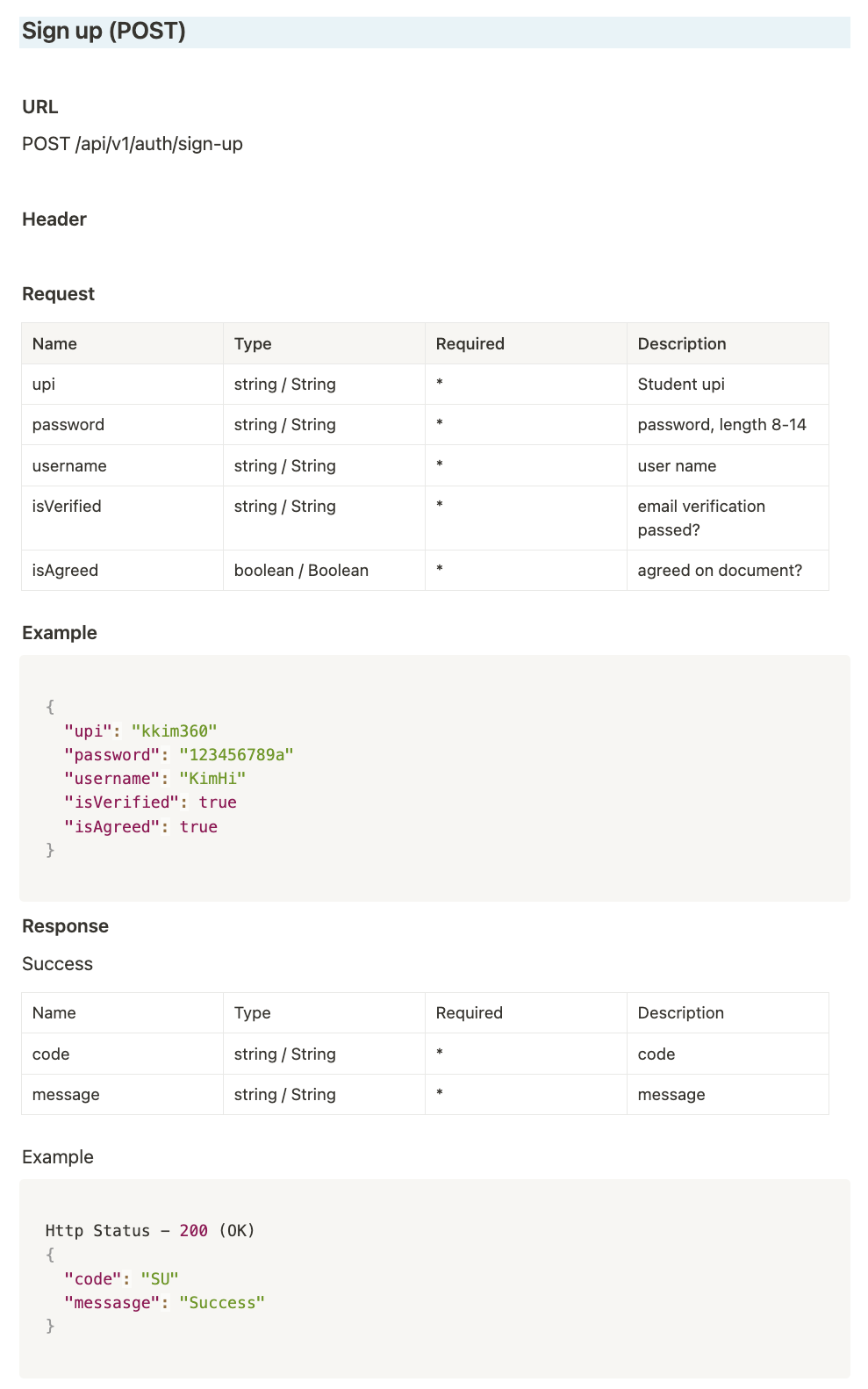
An API document is a structured document that organizes API endpoints by their addresses. It includes details such as HTTP methods, API addresses, variable names, data types for requests and responses, and HTTP status codes.
Creating an API document offers several benefits. In real-world development, an API document is can be used to enables frontend developers to work independently without relying on backend data. By mocking API responses, the frontend can proceed with development without waiting for the backend to be completed.
However, as a full-stack developer handling both frontend and backend, the primary reason for creating an API document is to synchronize types, variables, and error handling between the two sides. Mismatches between the frontend and backend can lead to various issues, such as API request failures due to type errors and unexpected database behavior such as saving data in wrong data type. These reasons are also why I chose to use TypeScript instead of JavaScript, ensuring stricter type consistency.
Put vs Patch
Both
PUTandPATCHmodify data in the database, so how do we decide which one to use? The main difference is thatPUTreplaces the entire resource, whilePATCHupdates only specific fields (partial update). This distinction might seem ambiguous at first. For example, inQuad, there is a like feature where users can toggle their like status on or off by clicking a button. I decide to implement like toggle feature by creating or deleting aLike Entity. Since I am dealing with entire resource: theLike Entity, I usedPUTmethod instead ofPATCHmethod.Then why am I not using the
POSTmethod, even though I am creating aLike Entity?The reason is that
POSTis notidempotent, meaning that sending the same request multiple times does not guarantee the same response each time. However, I want my LIKE feature to behave consistently every time it is called, ensuring the same result regardless of repeated requests. These are the only two behaves that I want like feature to have: 1. If the user has already liked the review, the LikeEntity is deleted.
2. If the user has not liked the review, a new LikeEntity is created.
Therefore, I considered using the
PUTmethod instead of thePOSTmethod, as it is more efficient to handle both actions within a single request.On the other hand, for editing a review, the server does not create or delete the entire review entity. Instead, they update specific fields in ready-written review such as title, content, and rating with new values.
Only certain fields in
Review Entityare being modified,PATCHis the better choice for this feature.
DCL, DDL and DML
Okey! We have just finished defining what data and types we need for this website. Let’s start granting database access, creating database tables and manipulating them by adding mock data. SQL command can be categorized into three types: DCL, DDL and DML.
DCL(Data Control Language)is used for user access control and permissions. It grants or restricts privileges on database objects. For example,DCLcommand below grants Kim the ablility toSELECT,UPDATE,DELETEandINSERTon thisWebsite database.
DDL(Data Definition Language)is responsible for defining the database structure. CommonDDLcommands includeCREATE,ALTER, andDROP. They affects the structure of table, but not the data itself. We can define column names and data types when creating a table using theCREATEquery, modify the table structure with theALTERquery, and delete a table using theDROPquery.
- Now that we have granted user a permission using
DCLand defined the table structure usingDDL, it is time to actually inject mock datas and check if the features are can work correctly.DML(Data Manipulation Language)allows us to insert, update, retrieve, and delete individual records in the database. The example below shows how to insert a new course into the course table using anINSERTquery.
Leave a comment