[Quad] 2. Authentication
Three Ways to Implement Authentication
Before implementing user sign-in and sign-up, we need to decide on an authentication method. Generally, there are three common authentication approaches:
-
Basic authentication: This method involves sending the user’s credentials (user ID and password) encoded in
Base64with every request. While it is simple to implement, several critical issues make it unsuitable:- Insecure: Basic authentication transmits credentials in an encoded format, not encrypted. Encoding is reversible, meaning attackers can easily decode and retrieve user credentials.
- Lack of session management: Since there is no session or token-based authentication, users must send their credentials with every request. This results in a poor user experience😡, as users have to repeatedly enter their credentials for every interaction, such as liking or commenting.
-
OAuth Authentication: Many of you have likely signed up for a website using third-party providers such as Google or GitHub. This process is implemented using
OAuth authentication.OAuthallows users to sign in using external identity providers (e.g., Google, GitHub) without directly handling their credentials.However, I have decided not to use
OAuthforQuadbecause I will not be integrating third-party authentication services. AlthoughOAuthcan also support internal authentication systems, implementing it requires significantly more time and effort compared to the next authentication method I will introduce. -
Bearer Token: When a client signs in, the server generates and transmits a
Bearer Tokento the client. This token remains valid until its expiration time set within the token.Once the client receives the
Bearer Token, it can use it for authentication by attaching it to theHTTP request headerwhen accessing protected resources. This is a example of anHTTP request headerwith aBearer Token:Authorization: Bearer <token>I will implement
Bearer Tokenauthentication usingJWT(JSON Web Token), which provides secure and stateless authentication. It ensures security through encryption with specific algorithms, and its stateless nature eliminates the need for servers to store session data. This means the server doesn’t need to query the database for each request, resulting in faster and more efficient authentication.
JWT…? Who are you?
-
How is a JWT token structured?
Jwtis consist of three parts, separated by dots(.):<Header>.<Payload>.<Signature>eyJhbGciOiJIUzI1NiIsInR5cCI6IkpXVCJ9.eyJzdWIiOiJ1c2VyQGV4YW1wbGUuY29tIiwicm9sZSI6ImFkbWluIiwiZXhwIjoxNzEwOTUwNDAwfQ.H0VlMa2UNxIl_6Im7vx2gCy0j2sr_vsaKdmX9EoIqKw ### This is what a JWT looks like. ### Try to find the two dots separating the JWT sections!- Header: This section defines the signing algorithm. I chose a symmetric key algorithm because it’s simpler to implement than asymmetric key algorithms. 😂
- Payload: It contains data fields, such as user data and
JWTexpiration time. ✅ Every payload properties are calledclaims. - Signature: The signature is generated when the
JWTis created. It is formed by encrypting the header and payload using the server’ssecret key. Once created, the signature cannot be altered.
-
How is JWT used for authentication?
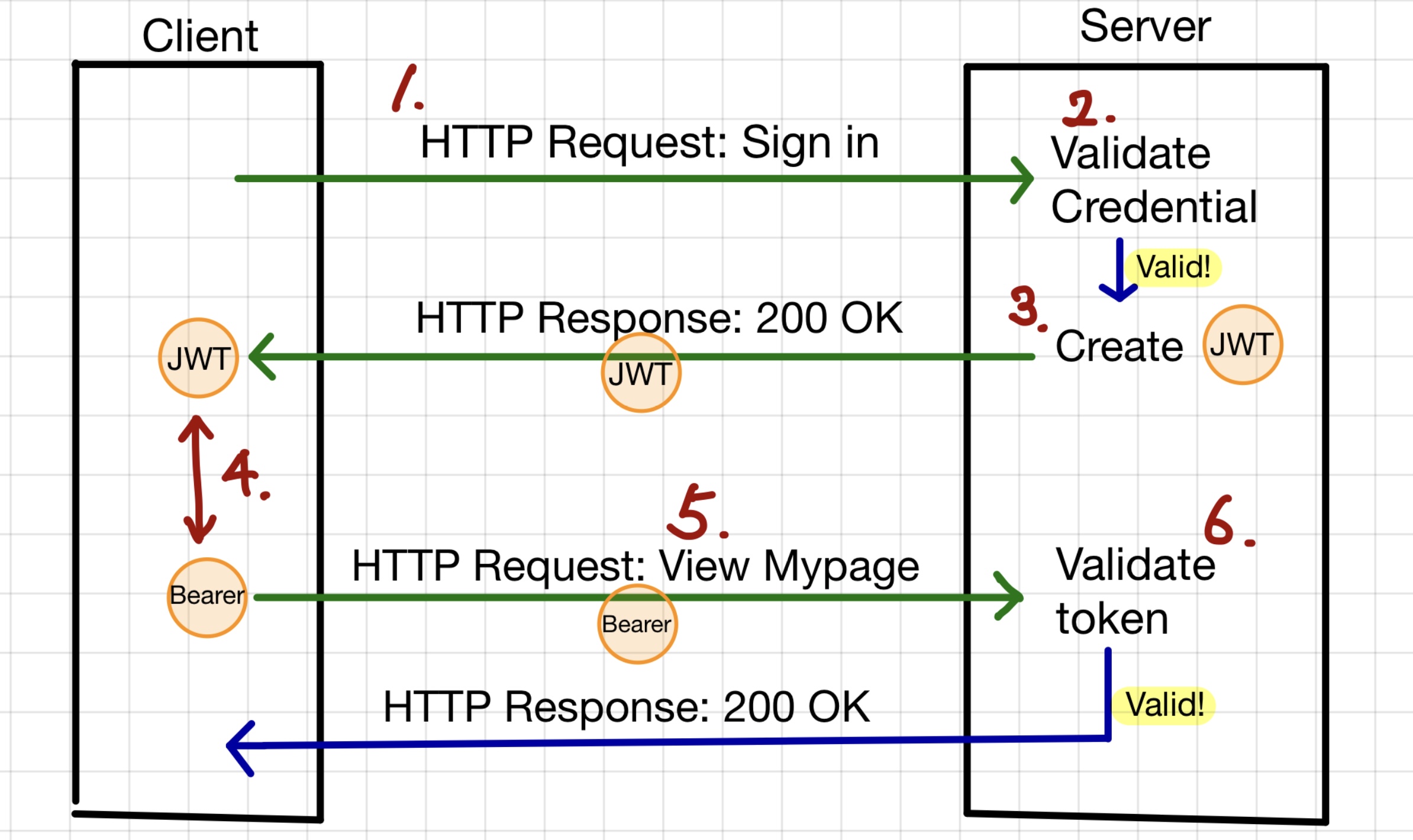
- The client signs in with a username and password and sends an
HTTP requestto the server for authentication. - The server verifies whether the provided credentials are valid by checking them against the database.
- If valid, the server generates a
JWT, and sends it to the client in anHTTP responseas aJSONobject. - Once the client stores the
JWT, it is used as aBearer Tokenfor authentication. - For future requests, the client includes the
Bearer Tokenin theHTTPheaders until theJWTexpires. - When the client sends a request with the
Bearer Token, the server verifies theJWT. If the token is valid and not expired, the server processes the request; otherwise, it rejects it.
- The client signs in with a username and password and sends an
In which part of the application is the Bearer token validated?
In Spring Boot, when a client sends a request, it passes through several filters before reaching the controller. Filters act as a security layer, verifying whether the request is valid.
Generally the request first goes through
-
CORSfilter -
Spring Securityfilter -
Custom filters like
JwtAuthenticationFilter -
And finally reaches the
DispatcherSevletwhich maps HTTP request to appropriate controller.
-
CORS filter
To understand
CORS(Cross-Origin Resource Sharing), we need to understandSOP(Same-Origin Policy).SOPis a fundamental security mechanism enforced by web browsers that restricts web pages from making requests to a different origin (protocol, domain, or port) than the one that served them. Origin refers to the protocol, hostname and port of a web application. Here is a example of origin:<protocol>://<hostname>:<port> ## e.g. http://localhost:3000By default,
SOPprevents unauthorized cross-origin requests, protecting data from malicious websites. For example, a front-end application running on http://localhost:3000 cannot directly access an API hosted at http://localhost:8080 due toSOPrestrictions.To enable cross-origin communication, the backend server must explicitly allow the frontend domain using
CORS(Cross-Origin Resource Sharing).To allow a frontend (http://localhost:3000) to send requests to the backend, configuring
CORSin the backend is required.CorsConfiguration configuration = new CorsConfiguration(); configuration.addAllowedOrigin("http://localhost:3000"); -
Spring Security filter
Spring security applies security logics such as authentication (who you are), authorization (what can you access) and
CSRF(Cross-Site Request Forgery) protection.In WebSecurityConfig.java, the security configuration file, there’s an interesting point to highlight.
httpSecurity.csrf(CsrfConfigurer::disable)I have explicitly disabled
CSRF. Even for someone unfamiliar withCSRF, just reading the term might give the impression that disabling it is a bad idea. So why have I disabled it?CSRF(Cross-Site Request Forgery) is an attack where a malicious website tricks an authenticated user into making unwanted requests to a web application while they are logged in. Being logged in means that the user is authenticated and has an active session on the server, rather than using stateless token-based authentication like JWT. In other words, it can be safely disabled when usingJWTorBearer Tokens. -
JwtAuthenticationFilter
JwtAuthenticationFilter is a custom Spring Security filter that extracts the JWT from the Authorization header, and validates it using JwtProvider. If the token is valid, it extracts the user details and stores them in SecurityContextHolder, making the user data accessible throughout the application.
SecurityContext securityContext = SecurityContextHolder.createEmptyContext();
securityContext.setAuthentication(authenticationToken);

SecurityContextHolder.setContext(securityContext);
Leave a comment